The short version
- Give every agent its own git worktree and branch, so no two sessions edit the same checkout.
- Worktrees isolate files, not ports, databases or caches. Plan for those.
- Merge one branch at a time, rebasing and re-running tests before each.
- The hard part after three or four agents is attention: knowing which session needs you.
One Claude Code session is a pleasure. You describe a change, it reads the code, edits, runs the tests and tells you what it did. The obvious next thought is: why not run four of these at once? Fix the login bug in one, build the settings page in another, write the migration in a third.
You can, and it works well, with a few rules. This guide covers the setup that holds up in practice, what breaks, and where the real limit turns out to be. We'll use ClankDesk's own repository as the example project.
Rule one: never share a checkout
Two agents in the same folder will step on each other. One runs the formatter while the other is halfway through an edit. One switches branches and the other's changes come along for the ride. Tests fail for reasons neither agent caused, and each one tries to "fix" the other's work.
The fix is a git worktree per agent. A worktree is a second (or tenth) working directory attached to the same repository. Each one has its own checked-out branch and its own files, while sharing the history and objects with the main checkout. Creating one takes a second and almost no disk space beyond the files themselves.
One worktree and branch per task
cd ~/code/clankdesk
git worktree add ../clankdesk-login-fix -b fix/login-redirect
git worktree add ../clankdesk-settings  -b feat/settings-page
git worktree list
Then start one Claude Code session in each folder, in its own terminal tab:
cd ../clankdesk-login-fix && claude
cd ../clankdesk-settings  && claude
Recent versions of Claude Code can do this step for you. claude --worktree <name> (or -w) creates a new worktree for the session, and --tmux opens it in its own tmux session. Check claude --help on your version, since flags change between releases.
Rule two: worktrees isolate files, nothing else
This is where most parallel setups break the first time. A worktree gives each agent its own files. It does not give each agent its own:
- Ports. Two dev servers both want port 3000. Make the port configurable (
PORT=3001 npm run dev) and tell each agent which one to use. - Databases. If two agents run migrations against the same local database, one of them will be surprised. Use a database per worktree, or keep schema changes to one task at a time.
- Untracked files. A new worktree has no
.env, nonode_modulesand no build cache. Expect an install step in each one, and copy local config deliberately. - Global state. Anything under your home folder, a shared Docker daemon, a simulator, a browser profile. Agents can collide there too.
None of this is hard to solve, but it has to be solved once per project. Write it down in the project's CLAUDE.md so every session gets the same instructions: which install command to run in a fresh worktree, how to choose a port, which database to use.
PORT=3001 npm run dev
A database per worktree, or one schema change at a time
An install step in every new worktree, and copy local config on purpose
Rule three: split work so the pieces don't overlap
Parallelism pays off when tasks touch different files. "Fix the login redirect" and "add a settings page" rarely collide. "Refactor the auth module" and "add OAuth to the auth module" will, every time.
When two tasks will obviously touch the same code, don't run them side by side. Run one, merge it, then start the other on top of it. You lose a little time and save a painful conflict, and an agent resolving a conflict in code it didn't write is not a good use of anyone's afternoon.
Rule four: merge one branch at a time
When sessions finish, resist merging everything at once. A safe loop for each finished branch:
- Review the diff.
git diff main...fix/login-redirectshows what the branch changed since it forked. - Rebase onto the latest main. Inside the worktree:
git rebase main. If it conflicts, hand the conflict back to the agent that wrote the code. - Run the tests again. The branch passed on the old main. It needs to pass on the new one.
- Fast-forward main. From the main checkout:
git merge --ff-only fix/login-redirect. - Clean up.
git worktree remove ../clankdesk-login-fix. Keep the branch until you're sure.
Fast-forward merges keep history linear and make it obvious when a branch is out of date: git simply refuses. Then the next branch rebases onto the new main and goes through the same loop. Our guide to reviewing AI-generated code before it merges goes deeper on step one.
How many agents is the right number?
Two things cap it, and neither is your CPU.
Your plan's usage. Every parallel session draws from the same subscription. Four agents use it roughly four times as fast, and when you hit the limit, all of them stop together. If you have both Claude Code and Codex, splitting work across them helps. We wrote about using Claude Code and Codex together.
Your attention. This is the real limit. Agents don't just work, they ask: which approach do you prefer, may I run this command, the tests fail for a reason I can't fix. With four tabs, one of them is always waiting, and you won't notice until you check. At some point you're no longer building. You're hunting through tabs, trying to remember which one was the login bug.
In practice, people find two or three manually supervised sessions comfortable. Beyond that you need something that tells you who needs you, rather than you asking each one.
Tooling options
| Approach | Good at | Watch out for |
|---|---|---|
| Terminal tabs + manual worktrees | Full control, nothing to install | You track every session and every merge yourself |
claude -w with --tmux | Fast worktree setup per session | Still one session per pane to watch |
| Subagents inside one session | Bounded side work like searches and reviews | One conversation, one context; not for independent features |
| A coordinator app such as ClankDesk | Splitting, scheduling, surfacing questions, merging | Another app in your workflow; Mac only today |
What ClankDesk automates
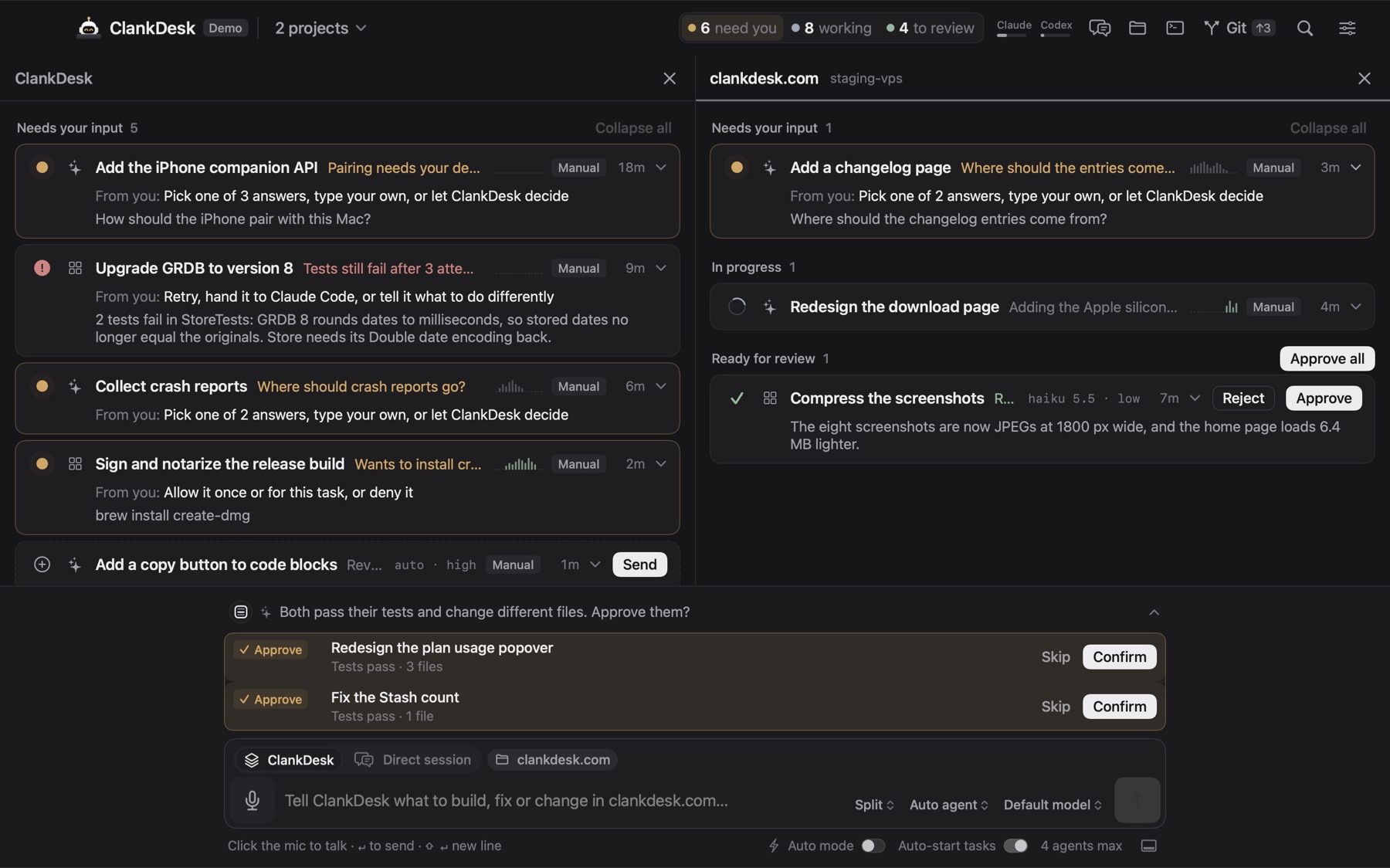
We built ClankDesk because the setup above works but the bookkeeping doesn't scale. You say or type what you want, and it does the coordination:
- Your message is split into tasks. Each one gets its own branch and worktree, and runs on Claude Code or Codex, up to the concurrency limit you set.
- Tasks that will touch the same files take turns, and the work a waiting task depends on can merge on its own first.
- When an agent asks a question or wants to run something risky, its card rises to the top of the board. Everything else stays quiet.
- When you approve, ClankDesk commits, rebases, runs your test command and fast-forwards your branch. A conflict or failing test goes back to the agent.
Whatever tool you use, keep the rule: one task, one worktree, one branch. It's what makes parallel agents safe to run in the first place.
If you'd like to see the whole loop before installing anything, the interactive demo runs in your browser.