The short version
- Tabs scale to two or three sessions. After that, the bottleneck is finding the session that needs you.
- Quick wins: one tab per task, task names as tab titles, a notification hook, a written list of what's open.
- The lasting fix is to stop tracking sessions and track tasks: intentions, not sessions.
It starts innocently. A text editor, and a terminal with one Claude Code tab. Then a second tab for the bug that came in. Then Codex in a third, because Claude hit its limit. An hour later there are a dozen tabs, each with a little title that says claude, and you're clicking through them one by one.
Which one was the login bug? Which one finished twenty minutes ago and is waiting for you to look? Which one asked a question, got no answer, and has been sitting there ever since? If this sounds familiar, you're not doing it wrong. You've just hit the point where tabs stop being a workflow.
Why tabs break down
A terminal tab is a container for a process. It knows nothing about the work inside it. That leaves you holding three kinds of state in your head:
- What each tab is for. The tab title doesn't say "Speed up the session transcript". It says
claude, or a truncated path. - Which tabs need you. A session waiting on a question looks exactly like a session that's busy. You only find out when you look.
- What's done but not merged. A finished session is just a quiet tab. Close it and the work may be stranded on a branch you'll forget.
Each of these is small. Together, with ten sessions, they turn you into a full-time session manager. You're spending your attention on coordination, the one thing the agents can't do for you in a tab.
Quick wins that help
1. One tab, one task, one worktree
Never reuse a session for an unrelated task. Give each task its own git worktree and branch, and its own tab. When the task is merged, close the tab. The number of open tabs then equals the number of open tasks, which is at least an honest count.
2. Name the tabs
Most terminals let you rename a tab. Use the task, not the tool: "login redirect", "settings page". With tmux, named windows do the same job. It sounds trivial and saves real time.
3. Get notified instead of checking
Claude Code supports hooks, commands it runs on events such as a notification that the session needs your input. Point one at a desktop notification and you no longer need to poll your tabs. Check the hooks section of the Claude Code docs for the current event names on your version.
4. Keep a written list
A plain text file with one line per open task and its state: running, waiting on me, ready to review, merged. Update it when you switch tabs. It feels like overhead, and it is, but it's less overhead than reconstructing the list from twelve terminals.
5. Cap your parallelism
Decide on a number, say three, and queue the rest. More sessions than you can supervise doesn't make you faster. It makes questions wait longer.
Signs you've outgrown tabs
Tips help for a while. These are the signals that the tab model itself is the problem:
- You've found a session that was waiting on a question for longer than it spent working.
- You've typed a reply into the wrong tab, and the wrong agent took it as an instruction.
- You've closed a tab and later found a finished branch that never got merged.
- You keep a second list somewhere, because the tabs can't tell you what's left.
- You start fewer tasks than you could, because supervising more feels like work.
The last one is the expensive one. The agents could do more. Your coordination is what's holding them back.
The deeper fix: manage intentions, not sessions
All of those tips treat the symptom. The cause is that the unit you're managing is the session, while the unit you care about is the task.
A session is temporary. It ends when the turn ends, when the usage limit hits, when you restart your Mac. A task is persistent: "fix the login redirect" has a goal, a branch, a history and a state long after any single session is gone. If your tool tracks tasks, sessions become an implementation detail that you only open when you're curious.
That shift changes what you need to see. Not twelve tabs, but three questions:
- What needs me? Questions, permission prompts, failures. On top, always.
- What's working? One line each, saying what's happening right now.
- What's ready to review? With a summary and pictures, not a transcript.
What that looks like in ClankDesk
ClankDesk is a Mac app built around that idea. You talk or type what you want, it splits the message into tasks, and runs Claude Code or Codex on each one in its own worktree. There are no tabs. There's one board:
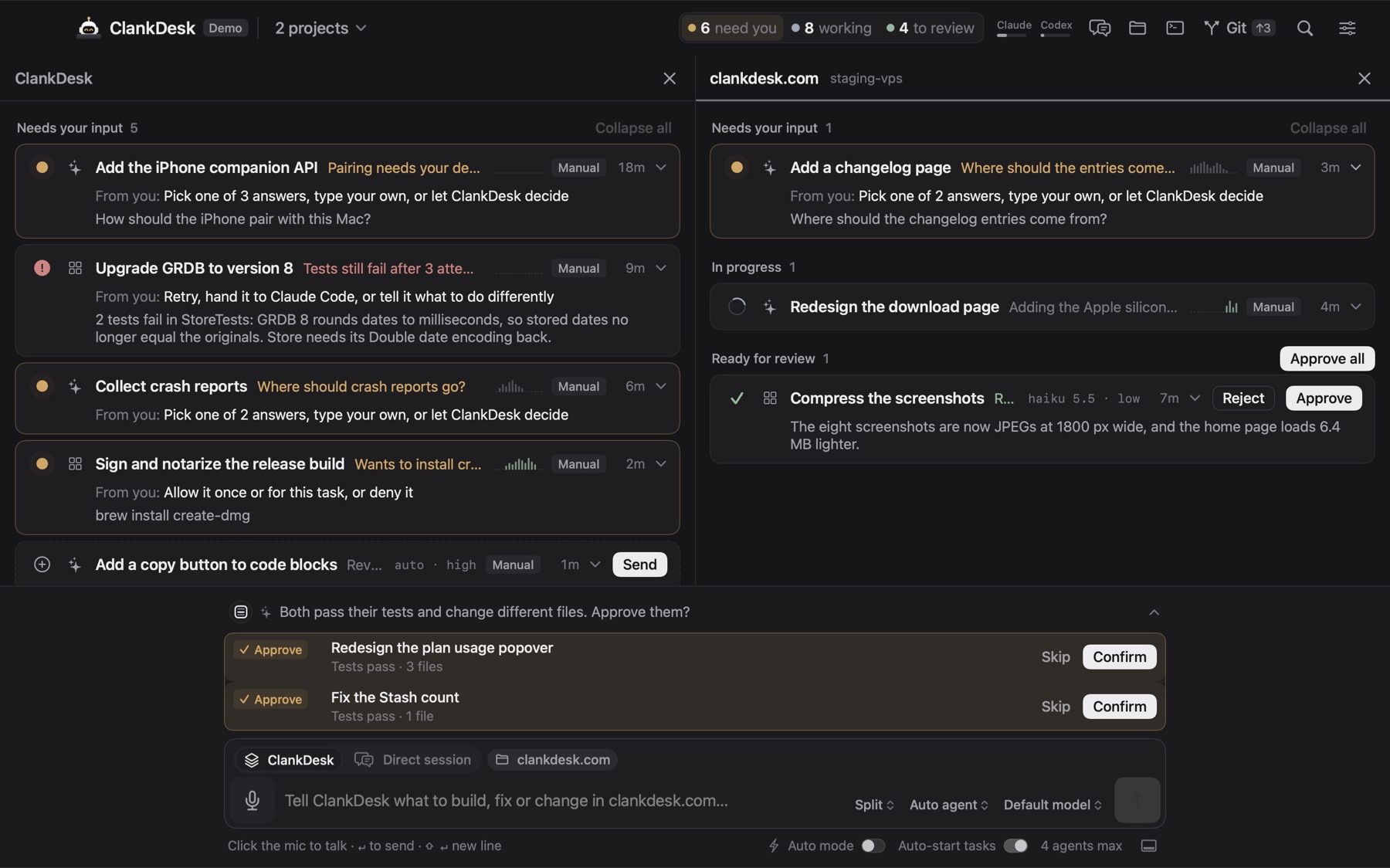
- Cards that need you sit on top, with the question and the options right on the card.
- Working cards show one plain line about what the agent is doing.
- The header counts what needs you, what's working and what waits for review, across projects.
- When you want the transcript, open the card's live session. Close it and nothing is lost.
- Approved work is merged on your Mac and the card leaves the board.
I don't do tabs. Questions interrupt the board, not your workflow.
If you'd rather stay in the terminal, the quick wins above will carry you a long way. If you're ready to stop hunting, try the interactive demo first. It runs in your browser.