The short version
- A command center sits above your coding agents. You give it intentions; it runs, tracks and merges the work.
- Its core job is routing your attention: show what needs a human, hide everything else.
- Eight capabilities matter: intake, splitting, isolation, scheduling, attention, review, safety and persistence.
An AI development command center is a single place from which one developer directs many AI coding agents. You describe what you want built. It turns that into tasks, runs agents such as Claude Code and Codex on them in parallel, brings you only the moments that need a human decision, and lands approved work in your repository.
It's the layer that appears once agents are good enough that the bottleneck stops being the code and starts being the coordination. One agent in a terminal doesn't need a command center. Six agents across two projects do.
Why the category exists
A coding agent on its own is a session: a conversation with a process in a folder. Running several means running several sessions, and the developer becomes the glue between them. You remember which tab is which, notice when one is waiting, decide what can run alongside what, review the results and merge them in the right order.
That glue work grows with every agent you add, and none of it is building. A command center takes it over. The shift is from managing sessions to managing intentions: you track what you want done, and the tool tracks the sessions doing it.
What it needs to do
- Intake. Accept requests the way you naturally give them: typed, spoken, with a screenshot, several at once, half-formed.
- Splitting. Turn one message into separate tasks with clear outcomes, and recognize when a message is a reply to an existing task rather than a new one.
- Isolation. Give each task its own workspace, usually a git worktree and branch, so agents can't step on each other or on your own uncommitted work.
- Scheduling. Decide what runs now and what waits: concurrency limits, dependencies, tasks that would touch the same files, usage limits on your plans.
- Attention routing. The heart of it. Surface questions, permission prompts and failures immediately. Keep running work quiet. Never make you poll.
- Review. Present finished work so you can judge it quickly: results, pictures, previews, a summary, and the diff when you want it.
- Safe landing. Merge approved work without surprises: rebase, test, fast-forward, and send conflicts back to the agent.
- Persistence. Tasks outlive sessions. A closed window, a usage limit or a restart shouldn't lose work or context.
What it is not
It isn't an IDE, though it may let you look at files. You aren't the one writing the code, so the editor shouldn't be the center of the screen. It isn't a Kanban board, because nobody drags the cards (we wrote about why columns are the wrong shape). And it isn't a chat with a task list attached. You may well talk to it, but parallel work needs first-class tasks, not messages you scroll back to find.
How to evaluate one
Questions worth asking of any tool in this space, ClankDesk included:
| Question | Why it matters |
|---|---|
| Where does the code run and merge? | Locally, on a server you own, or in someone's cloud changes what you're trusting. |
| Which agents does it support, on whose account? | Using your existing Claude or ChatGPT plan avoids a second bill and a second set of limits. |
| How are permissions handled? | Look for a real policy, not just "allow everything" or a prompt for every command. |
| What does it do to your git repository? | Force pushes, resets and stashes in automation are how work gets lost. |
| What happens when you close it? | Work should continue and survive a restart. |
| How does it show finished work? | If the answer is "a transcript", you'll be reading a lot. |
When you don't need one
Not everyone does. If you run one agent at a time, watch it work and merge by hand, a terminal is all you need, and adding a layer above it only adds steps. The same goes for work where you want to steer every edit as it happens. That's pairing, and an editor with an agent panel is the right tool.
A command center starts paying off when at least one of these is true: you regularly have more than two or three agents running, you lose track of which one is waiting on you, finished work sits unmerged because reviewing it is a chore, or you hit usage limits and want the work to carry on with another agent. If none of those sound familiar yet, bookmark this page for later.
ClankDesk's answers
ClankDesk is a command center for one developer on a Mac. Our answers to those questions:
- Runs and merges on your Mac, or on a server you point a project at over SSH.
- Claude Code and Codex, on your own plans, with Codex taking over when Claude hits its usage limit.
- A permission policy that lets routine work run and turns risky commands into a question on the card. Agents can't push, merge pull requests or publish releases.
- Non-destructive git: one worktree per task, fast-forward merges after your tests pass, and no force push, hard reset or stash anywhere in its git code.
- A background service that keeps working with the window closed and resumes sessions after a restart.
- Visual review: summaries, images, before and after screenshots, live previews, then the diff.
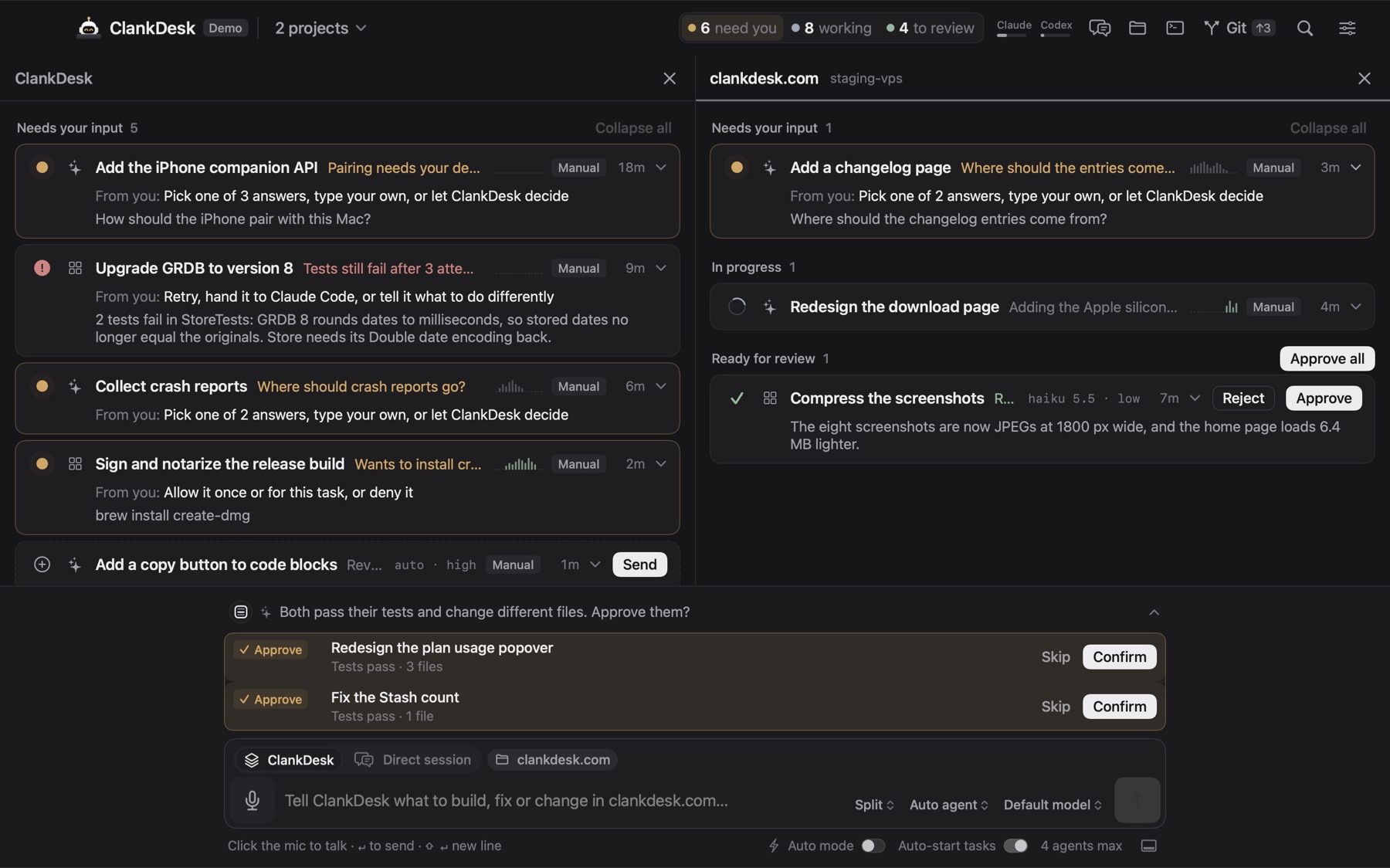
The best command center is the one you barely look at. It should feel like briefing a team that remembers everything and manages itself.
See every capability on the features page, or try the demo.