The short version
- Review in this order: the request, the result, the risky parts of the diff, then the tests.
- Look at the result before the code. A screenshot or a preview answers "is this what I asked for?" fastest.
- Spend your reading time on boundaries: data writes, auth, migrations, dependencies, deleted code.
- Merge one branch at a time, rebased and re-tested. Send problems back to the agent that wrote the code.
Coding agents finish a lot of work. That's the point. It also means the bottleneck moves: the agent writes code faster than you can read it, and "the agent says it's done" quietly starts to mean "it's merged".
It shouldn't. Agent finished is not the same as you approved. Here's a review routine that keeps you in charge without reading every line of every diff.
1. Start from the request, not the code
Before opening the diff, reread what you asked for. Then read the agent's summary of what it did. The most common problem with AI-generated code isn't a bug. It's code that cleanly solves a slightly different problem than the one you had.
Ask three questions:
- Did it do what I asked, all of it?
- Did it do things I didn't ask for? Unrequested refactors, renamed files, new dependencies.
- Did it make decisions I'd want to make myself? A good agent asks. A hurried one assumes.
2. Look at the result before the code
For anything with a user interface, the fastest review is to look at it. A before and after screenshot tells you in two seconds whether the layout change is what you meant. A live preview of the branch lets you click through the flow. Logs and diffs can't do that.
For a backend change, the equivalent is running it: one request against the new endpoint, one run of the script, the test that proves the fix. If the agent can't show you the result, that's information too.
3. Read the diff where the risk is
You don't need to give every line equal attention. Generated code tends to be consistent and well-formatted on the surface. The risk lives at the boundaries. Read these closely:
| Look at | Why |
|---|---|
| Data writes and migrations | Hard to undo. Check what runs against which database. |
| Auth, permissions, input validation | Plausible code can still let the wrong user in. |
| New dependencies | Each one is code you now trust. Is it needed? Is it the real package? |
| Deleted code and changed tests | An agent can make a failing test pass by weakening it. |
| Error handling | Look for swallowed errors and silent fallbacks. |
| Config, CI and scripts | Small edits here change how everything else runs. |
For the rest, skim for shape: is it in the right place, does it follow the project's patterns, is it about the size you expected? A two-line bug fix that comes back as a 600-line diff deserves a question before a review.
Useful commands
git diff --stat main...fix/login-redirect     # how big, which files
git diff main...fix/login-redirect -- '*.sql' # just the migrations
git log main..fix/login-redirect --oneline    # the agent's commits
4. Trust the tests you can see fail
"All tests pass" is only as good as the tests. When an agent adds a test, check that it would fail without the change. When it modifies an existing test, find out why. The best agent instruction we know for this is to ask for the test first: write a test that fails for the right reason, then make it pass, and say which test proves the change.
Then run the tests yourself, on top of the current main, not the main the agent started from.
5. Merge safely, one at a time
With several agents, finished branches queue up. Merge them one by one: rebase onto the latest main, run the tests again, fast-forward. If the rebase conflicts or a test fails, send it back to the agent that wrote the branch with the details. It has the context to fix it. You don't need to.
The full loop, with commands, is in our guide to git worktrees for AI coding agents.
When to send it back
- It solved a different problem. Say what you meant, in one or two sentences.
- It's too big. Ask for the smallest change that does the job.
- You can't explain what changed. If you couldn't defend the merge, it isn't ready.
Sending work back is cheap with agents. That's the upside of the whole arrangement. Use it.
How ClankDesk handles review
ClankDesk is built so that review is a decision you make, not a chore you do. When an agent finishes, its card becomes a short walkthrough of the work:
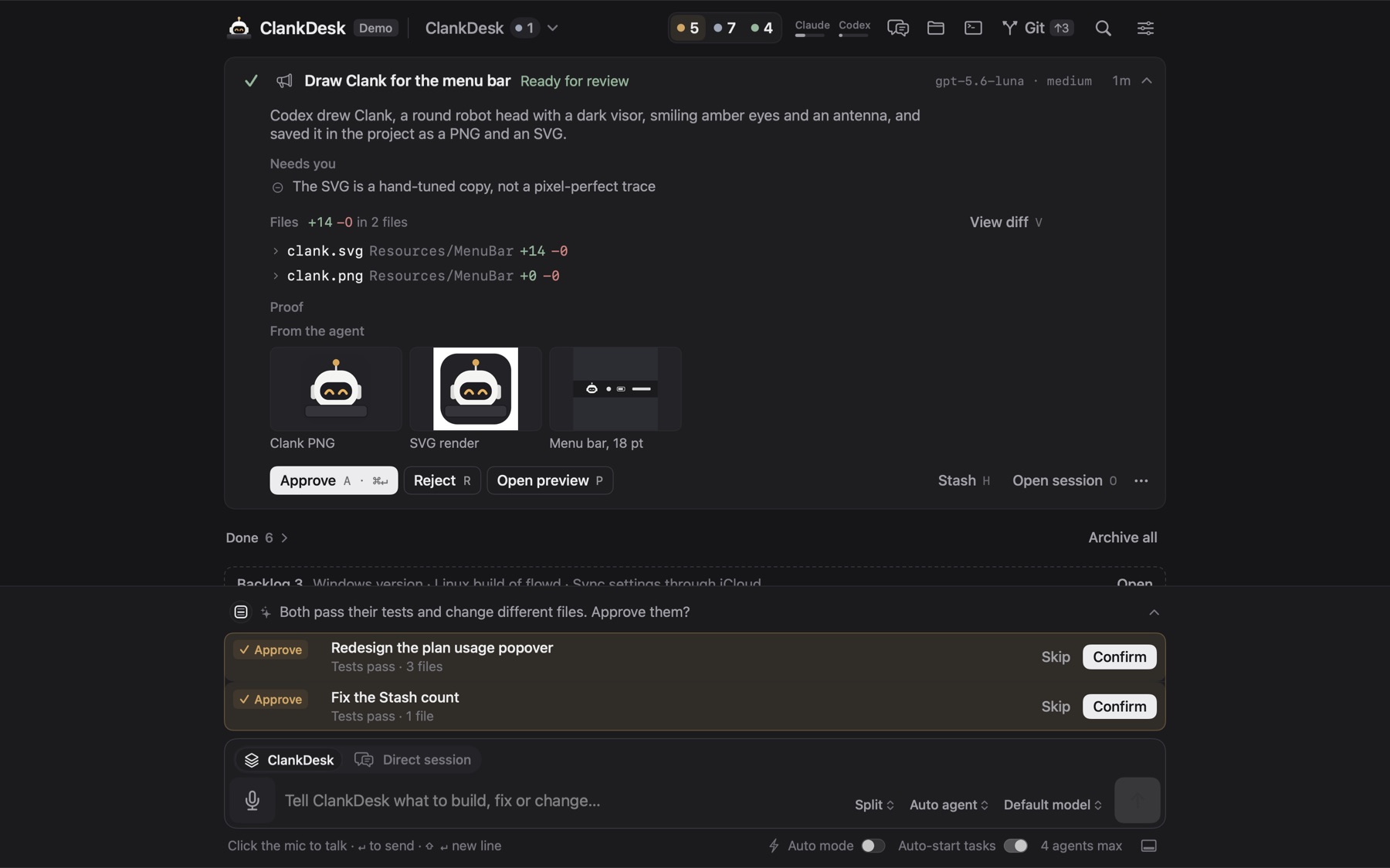
- The result first: a summary, the images the agent produced, links, and before and after screenshots when you turn them on. Open preview runs the branch's dev server.
- The diff when you want it, with the changed files listed.
- Reject offers Request changes, which sends it back to the agent, or Discard, which archives it unmerged and keeps the branch. Or just reply to the card: "make that button smaller".
- Approve commits what's left, rebases, runs your test command and fast-forwards your branch on your Mac. A conflict or a failing test goes back to the agent, not to you.
- Branches stay current. After any merge, other branches waiting for review are rebased, so you never review against a stale main.
Turn on the Tests first superpower and every agent writes the proving test before the change, and names it in its report.
See it on the features page or in the demo.