The short version
- Vibe coding breaks at scale for boring reasons: one endless session, unreviewed merges, and a repository nobody can follow.
- Keep the vibe for the asking. Add structure to everything after: one task, one branch, one review.
- Write standing rules once, so you don't repeat them in every prompt.
- Merge small and often. Clear finished work off your screen.
"Vibe coding" is the name Andrej Karpathy gave in early 2025 to building software by describing what you want and accepting what the model writes, mostly without reading it. For a weekend prototype it's wonderful. You say what you want, things appear, you keep going.
Then the prototype becomes something you use every day. You have ten ideas instead of one, two agents instead of one session, and a codebase you'd like to still understand next month. The vibe doesn't have to go. It needs a workflow underneath it.
Where it breaks
- The endless session. One conversation that's been fixing, adding and refactoring for three hours. The context is full of old decisions, and the agent starts undoing its own work.
- Everything at once. "Also fix the header, and the email, and add dark mode" in one prompt gives you one giant diff that's impossible to review or revert in parts.
- Merging on trust. When nothing is reviewed, the bug from Tuesday is found on Friday, buried under four other changes.
- The forgotten branch. Work that finished but never merged, sitting in a tab you closed.
The workflow
- Keep asking loosely, then split. The vibe is in how you ask: talk, ramble, list everything you noticed. But before work starts, split that into tasks, one outcome each. "Fix the login redirect" and "add dark mode" are two tasks, even if you said them in one breath.
- Give every task a done line. One sentence that says how you'll know it worked. "The settings page opens and saves without a reload." Agents work better toward a finish line, and you review faster against one.
- One task, one branch, one worktree. Each task runs in its own git worktree, so tasks can run in parallel and each one can be thrown away on its own.
- Let the agent ask. For anything bigger than a fix, ask for a plan first and let the agent come back with questions. Answering one question up front is cheaper than reviewing a wrong guess.
- Look at results, not logs. Screenshots, a preview, a quick run. You'll catch "that's not what I meant" in seconds. Then skim the diff where it matters (see reviewing AI-generated code).
- Merge small and often. Approve each task as soon as it's right, rebased and re-tested. Small merges are easy to understand and easy to revert.
- Clear the board. Merged work should disappear from view. Ideas for later go in a backlog, not in your head.
Write your rules once
Half of every long prompt is the same: run the tests, don't add dependencies, keep the change small, explain what you did. Put that in the project's instruction file (CLAUDE.md for Claude Code, AGENTS.md for Codex) once, and your prompts shrink to the part that's actually new.
A few standing rules that pay off in almost every project:
- Write or update a test that fails for the right reason before changing behavior.
- Make the smallest change that does the job. No drive-by refactors.
- Explain why, not only what, in the summary.
- Ask instead of assuming when a decision isn't covered by the request.
What a day looks like
In the morning, you walk through the app and say everything you notice: two bugs, a layout tweak, a feature you've been meaning to start, an idea for later. That becomes four tasks and a backlog item.
While they run, you do something else. A question comes in about whether the new setting belongs on the General tab or its own tab; you pick one in a click. A finished bug fix comes back with a before and after screenshot; it's right, you approve, it merges. The layout tweak is close but the spacing is off; you reply "a bit tighter" and it goes back. By lunch, three of the four are merged and the board shows the one still running.
At no point did you read a transcript, pick an agent, or remember which tab held what. That's the vibe, kept.
How many things at once?
Parallel agents are where vibe coding gets its second wind: while one task runs its tests, another is halfway through a feature and a third is waiting for your answer. The limit is how many open tasks you can keep track of. In a terminal that's about three. With a tool that tells you which task needs you, it's more. Our guide to running Claude Code agents in parallel covers the setup.
The same workflow in ClankDesk
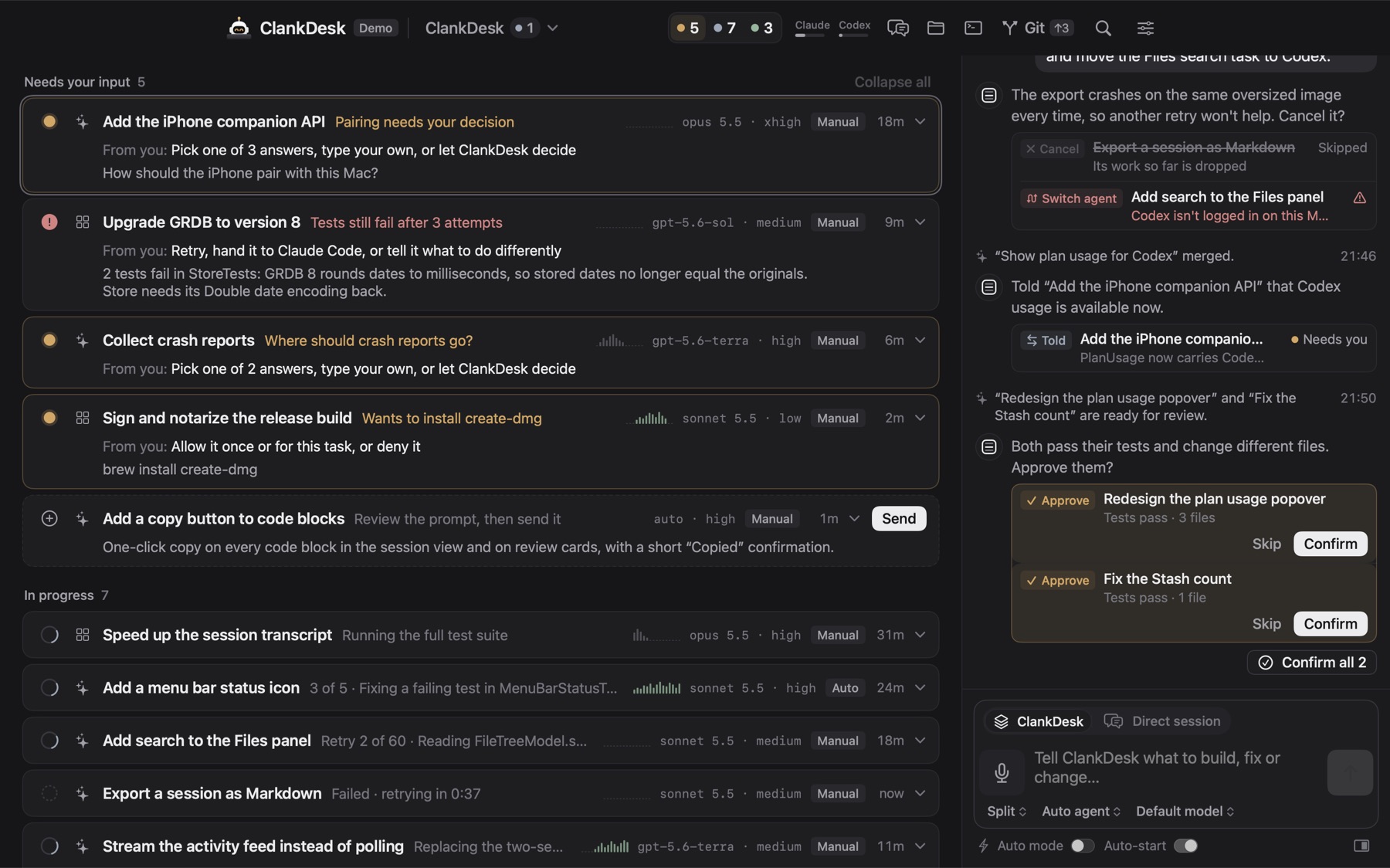
ClankDesk is this workflow with the bookkeeping taken over. You keep the loose part: talk or type. It does the structured part:
- Your message is split into tasks with plans. Ideas for later go to the backlog.
- Each task gets a branch and worktree and runs on Claude Code or Codex in parallel. Tasks that would touch the same files take turns.
- Agents ask on the card, with their plan and the options, often with one marked as recommended, in every permission mode.
- Finished work comes back as a walkthrough with images and a preview. Approve merges it on your Mac after your tests pass, and the card leaves the board.
- Standing rules are switches: Superpowers such as Tests first, Minimal diff and Explain the why apply to every agent, for one project or all of them.
Keep the vibe in the asking. Put the discipline in the tool.
Try the loop in the interactive demo, or read the full feature list.