The short version
- Voice works for agents because you dictate intentions, not code. Nobody has to say "open curly brace".
- A good spoken brief has four parts: where, what's wrong or wanted, what done looks like, and limits.
- Read the transcript before you send it. Recognition still mangles identifiers.
- One long ramble can hold several tasks. Let a tool split it instead of trimming yourself.
Voice coding used to mean dictating syntax: elaborate grammars for brackets, indentation and camelCase, mostly used by people who couldn't type for long. It worked, and it was hard.
Coding agents changed the deal. You no longer dictate the code. You dictate what you want, the way you'd explain it to a colleague standing next to you, and the agent writes the code. That's a job speech is very good at. Most of us talk three or four times faster than we type, and we explain things more fully out loud, because talking doesn't feel like effort.
Why talking makes better briefs
When people type prompts, they compress. "fix login redirect" is a typed prompt. When the same people talk, they give context without being asked: "After you log in from the pricing page, it sends you to the dashboard instead of back to pricing. It should go back to wherever you came from. Don't touch the OAuth flow, that's being changed in another task."
That second version is a much better brief. It says where, what's wrong, what done looks like and what to avoid. The agent will ask fewer questions and make fewer wrong guesses. Speaking nudges you into giving it.
What to say: a four-part brief
- Where. The screen, file or feature. "In the session view…", "On the settings page…"
- What's wrong, or what you want. Describe behavior, not implementation. "Long transcripts take seconds to open."
- What done looks like. "A transcript with a thousand messages opens instantly, and scrolling stays smooth."
- Limits. What not to touch, which approach you don't want, anything another task is handling.
You don't need to recite these as a list. Just make sure all four come up. If you forget one, a good agent asks, and a question on a card is cheap.
An example
Here's a real-sounding ramble about ClankDesk itself, the kind of thing you'd say while clicking around the app:
The session view is slow when a transcript is long, it should open instantly even with a thousand messages. Also the menu bar icon should show how many cards need me. And someday we should let people export a session as Markdown, but not now.
That's three intentions in one breath, and they shouldn't be one task:
- Speed up the session transcript. Done when a thousand-message session opens instantly.
- Show the needs-you count on the menu bar icon. Done when the number matches the header.
- Export a session as Markdown. Explicitly later: a backlog item, not a running task.
Split like this, the first two can run in parallel in separate branches, and each can be reviewed and merged on its own.
What not to dictate
- Identifiers you can't pronounce.
TranscriptReaderbecomes "transcript reader" and that's usually fine, since the agent will search for it. Exact strings, URLs and version numbers are safer pasted. - Code. If you find yourself dictating a function body, type it, or describe what it should do instead.
- Secrets. Never say passwords or keys out loud to a transcriber. Put them in your environment.
Always read before you send
Speech recognition is very good and still not perfect, especially with jargon. Before sending, skim the transcript for:
- Technical words heard as ordinary ones ("get" for
git, "react" for React, "sequel" for SQL). - Negations that got lost. "Don't remove the cache" turning into "remove the cache" is the expensive kind of typo.
- Names of files and functions you'd want exact.
A tool that drops the transcript in an editable box, rather than sending it straight away, makes this a two-second habit.
Tools for talking to agents
You have a few options, and they combine well:
- macOS Dictation works in any text field, including a terminal. Turn it on in System Settings under Keyboard, and choose its shortcut there.
- Dictation apps add their own models, vocabularies and shortcuts system-wide.
- Voice built into the agent tool, where available, keeps everything in one place. Check your tool's current docs.
All of these get words into a prompt. What none of them do on their own is decide what those words should become. Three minutes of talking often holds three or four separate tasks, and pasting the whole ramble into one session gets you one agent trying to do everything at once.
Speaking to ClankDesk
ClankDesk was designed around the voice-first workflow. The hero line on our home page is the whole idea: speak tasks into existence.
- Hold to talk. Pick a hold-to-talk key in Settings. Hold it from anywhere on your Mac: ClankDesk comes forward and listens. Let go, and the transcript sits in the composer for you to read and fix before sending. There's a mic button too.
- Talk for as long as you need. Dictation keeps going for minutes, so a full briefing fits in one go.
- On your Mac when possible. ClankDesk uses Apple's speech recognition, on your Mac when macOS supports it. If it has to fall back to Apple's servers, it tells you.
- One ramble, many cards. Send it, and ClankDesk splits what you said into separate tasks, each with a plan, and runs them in parallel. "Someday we should…" goes to the backlog.
- Answer by voice. When a card asks a question, you can answer it out loud too.
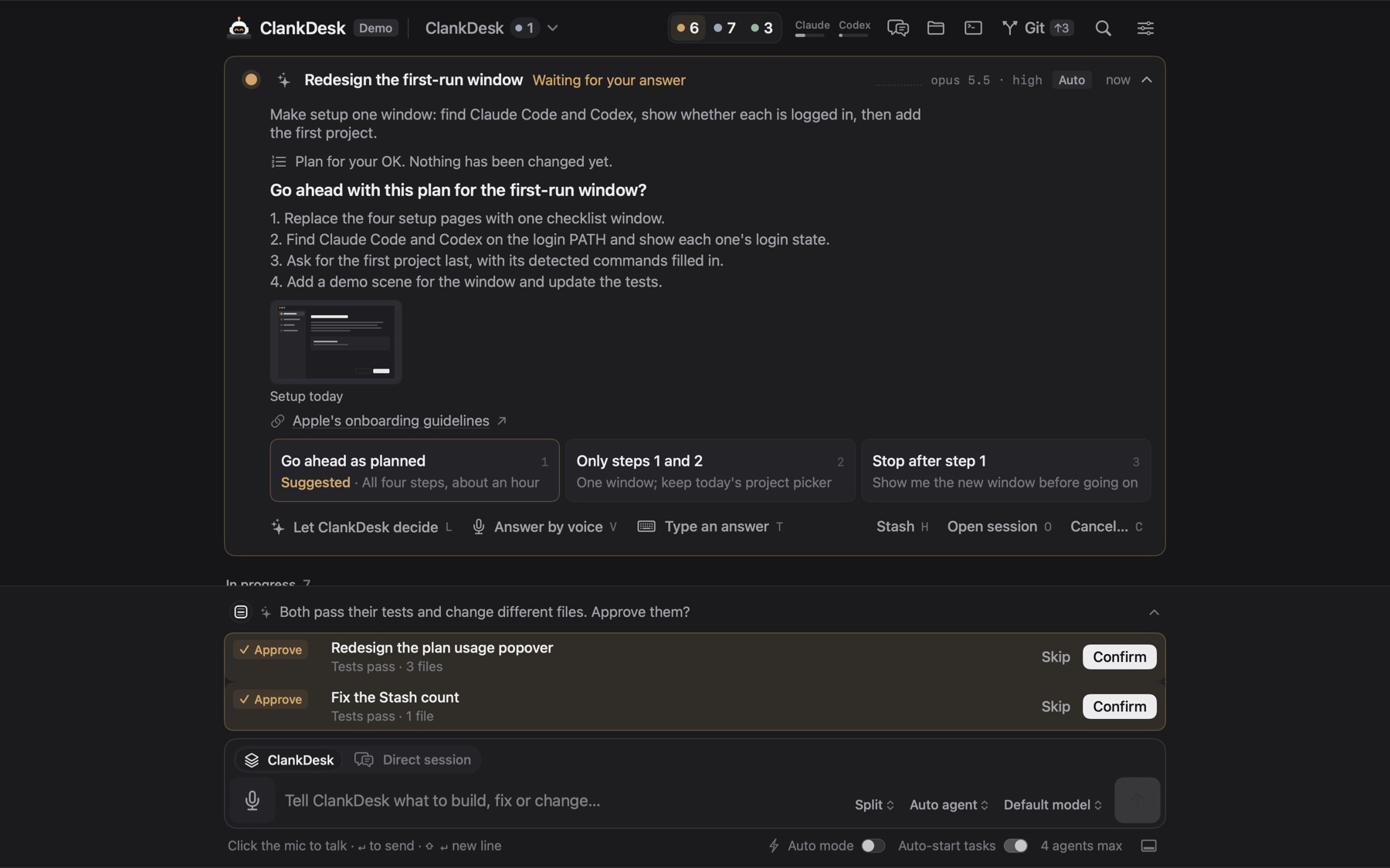
Try it on your next batch of small fixes: walk through the app, say every annoyance out loud as you see it, then send once. Come back to a board of cards.
The interactive demo shows the loop from message to merged work. The rest is on the features page.